






Why switch from Verkada to Spot AI
If your Verkada contract is up for renewal or you are facing a hardware refresh, it is worth asking whether the next cycle has to look like the last one. Spot AI takes a different path: it turns the cameras a business already owns into an AI Security Guard, so security teams can modernize detection and real-time deterrence without replacing their fleet. This guide walks through the moments when a switch makes sense, what actually changes operationally, and how to plan the move so day-to-day coverage is never interrupted.
Key takeaways
- The most common reasons teams look at switching are a contract renewal, a hardware refresh, or a run of missed or slow-to-resolve incidents.
- Verkada's full AI analytics and active deterrence run on its own cameras and audio hardware; Spot AI is camera-agnostic and works with the ONVIF cameras a site already owns.
- Spot AI's hybrid edge-to-cloud architecture keeps full-resolution video on site and sends only event metadata across the network.
- Switching does not mean ripping out cameras: keep the ONVIF IP fleet you have and bring legacy analog in through the IVR.
- Plan the move in phases (assess, pilot, cut over, tune) so operations stay live throughout.
Here is how the two platforms line up on the criteria that matter most when you are weighing a switch. Competitor details reflect Verkada's own current documentation; where a detail is not publicly documented, it is marked as such rather than assumed.
| Criterion | Verkada | Spot AI |
|---|---|---|
| Camera model | Sells its own cameras. Third-party ONVIF and RTSP cameras are supported through the Command Connector, with reduced analytics on non-Verkada devices. | Camera-agnostic. Works with the ONVIF IP cameras a business already owns, with legacy analog brought in through the IVR. |
| Architecture | Cloud-first platform. | Hybrid edge-to-cloud: full-resolution video stays on site, only event metadata crosses the network. |
| AI analytics | Full AI capabilities are tied to Verkada's proprietary cameras and hardware. | AI Security Guard runs across the existing fleet, detecting in context and surfacing what matters. |
| Active deterrence | AI-Powered Deterrence (public beta, February 2026) requires Verkada proprietary cameras and specific audio hardware such as its horn speaker or intercom. | Detect in context, then deter in seconds with talk-down, lights, and sirens using standard speakers on the cameras you already run. |
| Data residency | Not publicly specified in a single figure; governed by Verkada's cloud model. | Video stays in the facility on the IVR; only metadata leaves the network. |
| Compliance | Documented on Verkada's trust pages; verify current status for your requirements. | NDAA-compliant, SOC 2, and PCI-clean by design. |
| Commercial model | Camera and license purchase plus subscription; figures not publicly specified. | Per-camera subscription that covers the IVR and software, on the cameras you already own. |
When it makes sense to switch
A switch is rarely worth the effort for its own sake. It becomes worth planning around a few specific moments.
- Contract renewal. Renewal is the natural checkpoint. Before you re-sign for another multi-year term, it is worth pressure-testing whether a camera-agnostic platform would give you more room to grow without another hardware commitment.
- Hardware refresh. If cameras are reaching end of life, the question is whether to buy another proprietary fleet or move to a model that runs on standard ONVIF cameras and keeps your options open for the next cycle.
- Missed or slow incidents. If your team is chasing footage after the fact instead of acting in the moment, that is a signal the current setup is recording more than it is helping. Customers report that shifting to context-aware detection and real-time talk-down changes how quickly they can act.
- Cost pressure. When budgets tighten, paying to replace working cameras is hard to justify. Reusing the fleet you already own changes that math.
Key terms
- ONVIF: an open standard that lets cameras from many manufacturers work with a common platform, so you are not locked to one vendor's hardware.
- RTSP: a streaming protocol many IP cameras use to send video, commonly used alongside ONVIF for compatibility.
- IVR (Intelligent Video Recorder): Spot AI's on-site recorder, which keeps full-resolution video in the facility and connects legacy analog cameras into the platform.
- Edge-to-cloud: an architecture that processes and stores video at the edge (on site) while sending lightweight metadata to the cloud for search and management.
What actually changes when you switch
The switch is less disruptive than most teams expect, because the cameras and the day-to-day workflow largely stay put.
- Your cameras stay. Spot AI is camera-agnostic, so your existing ONVIF IP cameras keep working, and older analog cameras connect through the IVR. There is no rip-and-replace requirement to get started.
- Where video lives changes. Instead of a cloud-first model, full-resolution video stays on site on the IVR, and only event metadata crosses the network. That keeps bandwidth demands low and footage in the building.
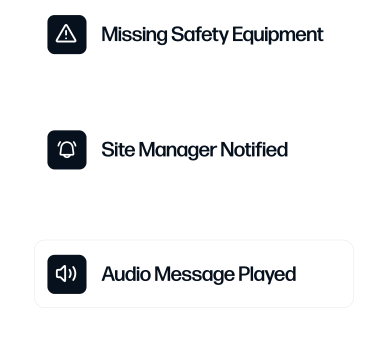
- Detection and deterrence become active. The AI Security Guard detects in context, then deters in seconds with talk-down, lights, and sirens, and packages case-ready evidence, rather than leaving the team to review recordings after an event.
- Administration stays familiar. Role-based access and single sign-on keep user management simple as you roll the platform across sites.
Before you switch, inventory your cameras by make, model, and connection type. Most ONVIF IP cameras carry straight over, and mapping the few legacy analog cameras that need the IVR up front makes the pilot faster and the cutover predictable.
This camera system can be used far beyond just a security camera... using people counting to tell how many people are in a site to maintain safe working conditions, sending alerts when machines need attention, and an alert when a license plate (delivery truck) has entered a site.
Dan M., Product Manager (Mid-Market)
A phased migration plan
Treat the move as a staged rollout rather than a single cutover. A predictable sequence keeps coverage live and gives the team time to adjust.
- Assess. Inventory cameras, network, and current incident workflows. Confirm which cameras are ONVIF and which analog cameras will connect through the IVR.
- Pilot. Stand up one representative site, connect its existing cameras, and configure the detections and deterrence that map to your highest-value use cases.
- Cut over. Roll the platform site by site, keeping existing coverage in place until each location is verified. Because the cameras stay, there is no coverage gap.
- Tune. Refine detections, alert routing, and talk-down responses against real events, and standardize the configuration that works best across the rest of the estate.
Common objections, answered
- "We just invested in Verkada hardware." You do not have to abandon working cameras. Spot AI runs on the ONVIF cameras you already own, so the fleet you paid for keeps earning its keep on a new platform.
- "Will there be downtime?" A phased, site-by-site rollout keeps existing coverage live until each location is verified, so there is no dark period during the move.
- "Will my team need to retrain?" The workflow centers on searching events and acting on alerts, and role-based access with single sign-on keeps administration familiar. Most teams are productive quickly.
- "What about compliance?" Spot AI is NDAA-compliant, SOC 2, and PCI-clean, and keeping video on site on the IVR simplifies data-residency questions.
Run the pilot at a site that represents your hardest conditions, not your easiest, so the results you see reflect what the rest of the estate will experience after cutover.
If Verkada renewal or a hardware refresh is on the horizon, the next step is to see the AI Security Guard running on cameras like yours. Book a demo to scope your sites, and compare the two platforms in detail on the Spot AI vs Verkada page. For a wider view of the market, see our guide to Verkada alternatives and the breakdown of Verkada pricing, or read how Spot AI approaches enterprise video security.
Frequently asked questions
Is it hard to switch from Verkada to Spot AI?
It is more straightforward than a typical camera replacement, because the cameras stay. Spot AI is camera-agnostic, so your existing ONVIF cameras keep working and analog cameras connect through the IVR. A phased rollout of assess, pilot, cut over, and tune keeps coverage live throughout.
Do I have to replace my Verkada cameras?
No. Spot AI works with the ONVIF IP cameras you already own, regardless of manufacturer, and brings legacy analog cameras in through the IVR. You can move to the platform without buying a new fleet.
Does Spot AI keep video in the cloud the way Verkada does?
Spot AI uses a hybrid edge-to-cloud architecture. Full-resolution video stays on site on the IVR, and only event metadata crosses the network. That keeps bandwidth low and footage in the building while still giving you cloud-based search and management.
How does Spot AI's deterrence compare to Verkada's?
Both offer active deterrence. The practical difference is hardware: Verkada's documented AI-Powered Deterrence runs on its proprietary cameras and audio hardware, while Spot AI's AI Security Guard detects in context and deters in seconds using standard speakers on the cameras you already own.
What does switching from Verkada cost?
Costs vary by site count, camera count, and configuration, so exact figures are not publicly specified for either platform. The structural difference is that Spot AI prices as a per-camera subscription covering the IVR and software on your existing cameras, rather than requiring a new proprietary camera purchase.
About the author
Joshua Foster is an IT Systems Engineer at Spot AI, where he focuses on designing and securing scalable enterprise networks, managing cloud-integrated infrastructure, and automating system workflows to enhance operational efficiency. He is passionate about cross-functional collaboration and takes pride in delivering resilient, high-performing systems.






.png)
.png)
.png)
.svg)