




Top companies leverage video intelligence to improve security and streamline day-to-day operations. If your team is accessing video recordings more often, you have likely started evaluating how cloud video security can modernize an aging camera system. In this post, we compare four proven approaches so IT, security, and operations leaders can decide which option delivers the right mix of performance, cost, and scalability.
Cloud video security refers to camera systems that use remote or cloud storage, centralized web dashboards, and AI analytics rather than only on-premises recorders. By moving recordings to the cloud—or a blend of cloud and edge—teams gain swift remote video monitoring, protected video storage, and automated alerts from anywhere with an internet connection.
Choosing the right solution can feel complex; a Google search for “cloud video security” returns dozens of products that look identical. How often will you review recordings? How many locations do you need to protect? What is your bandwidth budget? This guide breaks down the pros and cons of four popular paths and where each shines.
Cloud cameras for all-in-one cloud video security
If total building safety is your top priority and you prefer a single vendor for both hardware and software, cloud cameras deliver an all-in-one experience. Each camera includes onboard storage and encrypted video transfer to the vendor’s data centers, giving you remote access without an onsite recorder.

Consider cloud cameras if:
- Your business is constructing new locations and can design cabling and network closets around a single cloud camera platform.
- You already operate a handful of sites and want a turnkey refresh without mixing brands.
- Comprehensive building safety — including environmental sensors and lockdown workflows —is a main priority.
Pros of cloud cameras:
- Premium hardware — purpose-built cameras often ship with higher-resolution sensors and built-in analytics chips.
- Rich software capabilities — most providers include mobile apps, heat mapping, and video AI out of the box.
- Smart bandwidth management — cameras store video locally and only upload on motion or when the user requests the video feed, reducing internet costs.
Cons of cloud cameras:
- High upfront expense — each camera can cost several thousand dollars, making sizable deployments costly.
- Vendor lock-in — because hardware and software are proprietary, you commit to one ecosystem for multiple years.
- Infrastructure overhaul required — legacy cameras and cabling must be replaced, which can disrupt operations.
Port forwarding with an existing network video recorder (NVR)
Some single-site businesses still rely on simple port forwarding to view their legacy network video recorder (NVR) from off-site. The method involves opening a specific port on your firewall and directing internet traffic to the recorder’s IP address.

Consider port forwarding if:
- You're a single-location small business with only a handful of users.
- You review video recordings infrequently — maybe once or twice a year for incident review.
- Advanced network security is not a priority and budgets are extremely limited.
Pros of port forwarding:
- Low expense — no new hardware or subscription fees are required.
- Keep current NVR — you can continue using the recorder already installed onsite.
Cons of port forwarding:
- No encryption — recordings travel across the open internet, exposing sensitive data.
- Firewall exposure — opening ports increases the attack surface for bad actors.
- Single-user limitation — performance drops quickly if more than one person attempts to stream video remotely.
- Breaks when IPs change — a new public IP address or router swap often knocks the setup offline.
Cloud video management software for enterprise-scale deployments
Major enterprises with dozens of locations and thousands of cameras often adopt cloud video management software (VMS). These platforms run fully in the cloud and stream live video 24/7, offering advanced functionalities such as video walls, centralized health monitoring, and role-based access controls.

Consider cloud VMS if:
- You're a sizable multi-location organization with dedicated IT resources.
- You are willing to pay more to use an extensive set of capabilities.
- Your network infrastructure already supports high, consistent upload bandwidth.
Pros of cloud VMS:
- Upgrade without replacing cameras — most VMS platforms are camera-agnostic, extending the life of in-place hardware.
- All cameras on one dashboard — security teams see every location on one unified dashboard.
- Comprehensive feature set — tools like video walls, map views, and advanced reporting cover even niche use cases.
- Mature ecosystem — integrations with access control, intrusion detection, and dispatch solutions are common.
Cons of cloud VMS:
- High expense — licensing and cloud egress fees add up quickly for extensive camera counts.
- Bandwidth heavy — streaming every camera 24/7 often requires costly network upgrades.
- Intricate deployment — setup can take weeks or months and typically needs professional services.
- Sensitive to outages — if your internet drops, live viewing and recordings stop swiftly unless local failover exists.
- VPN requirements — many platforms need a separate VPN for secure remote viewing.
Hybrid cloud video security for flexible multi-site operations
Small- to medium-sized businesses with multiple locations—and teams that review video daily—often find hybrid cloud video security delivers a strong mix of local storage and cloud retrieval. A smart on-premises appliance records full-resolution video locally while thumbnails and key events sync to the cloud for real-time remote viewing.
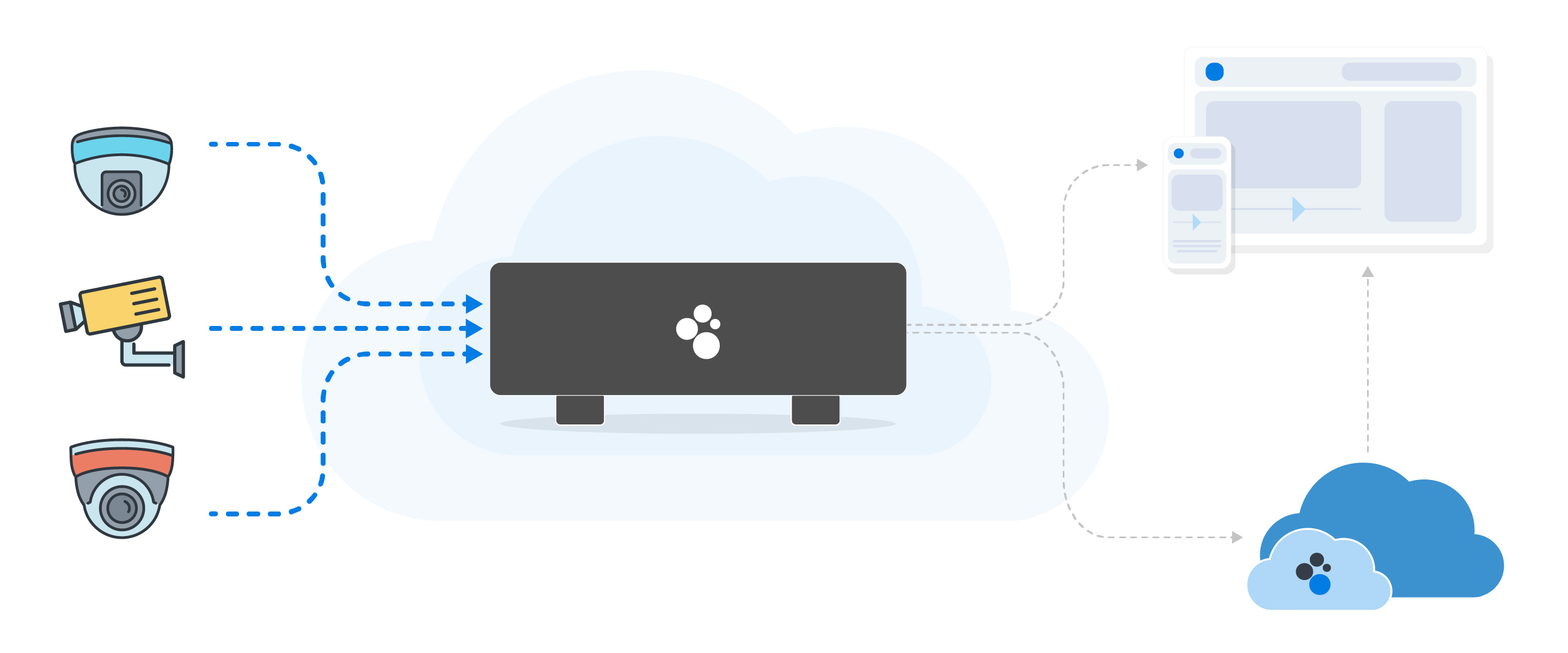
Spot AI’s hybrid approach is trusted by thousands of businesses nationwide. Systems are live in under a week, and the secure, bandwidth-friendly design keeps video accessible even during internet outages.
Pros of hybrid cloud video security:
- Simple, fast setup — plug-and-play appliances detect current cameras and quickly auto-configure.
- No camera replacement needed — keep your in-place analog and IP cameras.
- All cameras on one dashboard — view, search, and share clips from any site swiftly.
- Powerful yet intuitive software — video AI, smart search, and incident reporting are included.
- Bandwidth friendly — appliances upload only compressed thumbnails unless full video is requested.
- End-to-end security — SOC 2 and NDAA-compliant architecture with encryption at rest and in transit.
Cons of hybrid cloud video security:
- Appliance required per site — although easy to install, an edge device is still an additional piece of hardware.
- Cloud capabilities vary by vendor — ensure the provider offers the analytics and retention policies you need.
Key considerations before moving to cloud video security
- Bandwidth: Assess current upload capacity and plan for peak usage or adaptive bitrate streaming.
- Retention policies: Decide how long you need to store recordings based on industry standards and storage costs.
- Cybersecurity: Favor solutions with zero-trust architecture, multi-factor authentication, and regular security updates.
- Compliance: Verify SOC 2, NDAA, ISO 27001, or FedRAMP alignment to satisfy auditing requirements.
- Role-based access: Limit who can view, export, or delete video, and maintain secure, tamper-evident audit logs.
Cloud video security options at a glance
Cloud cameras
Typical fit: New builds, small portfolios
Key strengths: Integrated hardware + software, sensor add-ons
Key limitations: High price, vendor lock-in
Port forwarding + NVR
Typical fit: Single location on a shoestring budget
Key strengths: No new spend
Key limitations: Security risks, unreliable remote access
Cloud VMS
Typical fit: Large enterprises with robust IT
Key strengths: Feature rich, camera agnostic
Key limitations: Costly, bandwidth heavy, intricate rollout
Hybrid cloud
Typical fit: Multi-site SMBs and mid-market companies
Key strengths: Fast deployment, low bandwidth, open to any camera
Key limitations: Edge appliance added, features vary by vendor
See Spot AI in action. Request a personalized demo to experience how quickly you can deploy video AI across your sites.
Frequently asked questions
What is cloud video security?
Cloud video security is a camera system architecture that stores or mirrors recordings in protected cloud data centers, making video accessible from any device while leveraging video AI, automatic updates, and scalable storage.
How is cloud video security different from traditional camera system?
Traditional camera systems rely on on-site recorders and local monitors, limiting video access to a physical location for reactive review. Cloud video security turns video into a proactive tool, enabling remote viewing, video AI insights, intelligent alerts, and automated software updates without manual maintenance.
What are the most important features to look for in a cloud video security system?
Key capabilities include end-to-end encryption, adaptive bandwidth management, video AI, centralized management across sites, and role-based access controls with detailed audit logs.
How do cloud video security solutions support compliance?
Prominent providers adhere to frameworks such as SOC 2, NDAA, ISO 27001, and FedRAMP, offering audit trails, encrypted storage, and regular penetration testing to meet industry and government requirements.
How secure is cloud video security?
Modern platforms employ zero-trust principles, AES-256 encryption at rest, TLS 1.3 in transit, multi-factor authentication, and continuous vulnerability scanning to safeguard video data.
Who are the leading vendors in cloud video security?
While the market is evolving, vendors that combine reliable security certifications, fast deployment, and camera-agnostic architecture are generally considered front-runners. Spot AI is trusted by thousands of businesses nationwide for secure, scalable video intelligence.
How do I choose the best cloud video security system for my business?
The best system depends on your specific needs. For new construction, all-in-one cloud cameras may be a fit. For large enterprises, a cloud VMS offers extensive capabilities. For multi-site businesses that want to upgrade current cameras without high bandwidth costs, a hybrid cloud approach offers a strong balance of performance and value.
About the author
Amrish Kapoor is VP of Engineering at Spot AI, leading platform and product engineering teams that build the scalable edge-cloud and AI infrastructure behind Spot AI’s video AI—powering operations, safety, and security use cases.

