






How to build and automate an incident escalation policy for multi-site construction
Managing incidents across a portfolio of active job sites is a high-stakes balancing act, and the stakes are measured in lives as well as margins. U.S. construction and extraction workers suffered 1,032 fatal work injuries in 2024 (Source: U.S. Bureau of Labor Statistics), and a single delayed report can turn a recordable event into a regulatory penalty. When a critical issue surfaces days after the fact, it is too late to mitigate losses or protect the people on site.
The root of that lag is usually a manual incident escalation process, where information gets lost in phone calls and email threads while response times slip. This guide lays out how to build and automate an incident escalation policy across every job site, so your teams move from reacting late to responding in the moment.
Key takeaways
- An incident escalation policy classifies events by severity and maps each level to a required response time, a named owner, and a routing channel.
- Multi-site construction adds coordination, data-fragmentation, and varying-regulation hurdles that manual paperwork cannot keep pace with.
- OSHA requires employers to report a work-related fatality within 8 hours, and a hospitalization, amputation, or loss of an eye within 24 hours (Source: OSHA).
- Automating detection and routing with video AI shortens response times and produces time-stamped evidence for accountability.
- A centralized dashboard gives leadership one view across every site, so systemic risks surface before they compound.
The real cost of delayed incident escalation in construction
When escalation is slow and inconsistent, the consequences flow straight through your most important measures of performance. Beyond the human safety risk, weak processes create financial and operational drag that eats into project margins and limits your ability to scale. The pressure is real: total U.S. fatal work injuries reached 5,070 in 2024, a rate of 3.3 per 100,000 full-time-equivalent workers (Source: U.S. Bureau of Labor Statistics).
Four costs stand out when incident escalation breaks down:
- Eroding project margins. A minor safety issue that is not reported or investigated can persist and grow into a serious accident, and unaddressed incidents cause downtime that extends well past initial projections.
- Regulatory penalties. OSHA maximum penalties for 2026 hold at $16,550 per serious violation and $165,514 per willful or repeated violation, and late reporting is a common, avoidable failure (Source: OSHA).
- Higher insurance and bonding pressure. A weak safety record, made worse by slow response, tends to raise premiums and can affect bonding eligibility, which makes it harder to bid on premium work.
- Subcontractor accountability gaps. Without time-stamped, objective evidence, it is hard to prove when a subcontractor breaks protocol or causes damage, which drags disputes out and delays projects.
Falls remain the leading fatal event on job sites, though the trend is improving: fatal falls, slips, and trips among construction and extraction workers fell to 370 in 2024 from 400 in 2023 (Source: U.S. Bureau of Labor Statistics). A faster escalation loop helps sustain that direction. For a broader look at the risks, see our guide to reducing the top injuries on construction sites.
How to build a modern incident escalation policy
A strong escalation policy gives you a clear, repeatable framework for handling incidents from first detection to final resolution. It removes guesswork and makes sure every event is treated with the right level of urgency. Start with four building blocks.
1. Define incident severity levels
The first step is to classify incidents by severity, which sets the required response time and who needs to be notified. A workable framework looks like this:
Severity level | Example events | Target response time |
|---|---|---|
Level 4 (critical) | Fatality, life-threatening injury, or severe property damage | Immediate |
Level 3 (serious) | Injury needing medical care beyond first aid, notable damage, or a reportable event | Within 1 hour |
Level 2 (moderate) | Minor first-aid injury, moderate damage, or an unsafe behavior with injury potential | Within 2 to 4 hours |
Level 1 (minor) | No injury, minimal damage, or an unsafe behavior that was corrected on the spot | Within 24 to 48 hours |
2. Map a clear escalation matrix
An escalation matrix maps incident types and severity levels to the right people, so the correct owner is notified without delay. Define a primary and a secondary owner for each scenario.
Incident type | Severity | Escalation trigger | Primary owner | Secondary owner |
|---|---|---|---|---|
Equipment failure | Critical | Upon detection | Site supervisor and safety manager | Project executive |
Worker injury | Serious | Within 15 minutes | Safety manager | Project manager |
Unsafe behavior | Moderate | Within 1 hour | Site supervisor | Safety manager |
After-hours trespass or theft | Serious | Upon detection | Security director and on-call manager | Local law enforcement |
Regulatory non-compliance | Moderate to high | Within 2 hours | Compliance officer | Executive leadership |
3. Assign a multi-level responsibility framework
Clear roles keep the escalation workflow moving. Assign responsibility across three tiers:
- Frontline teams (supervisors). They handle scene stabilization, first aid, and the initial incident report. The first ten minutes are decisive for assessing the situation and establishing command.
- Mid-level leaders (safety and project managers). They coordinate the investigation, put remedial measures in place, and make sure compliance documentation is complete.
- Executive leadership (VP of operations and project executives). They oversee high-severity incidents, manage communication with regulators, and drive systemic fixes based on patterns across all sites.
4. Route each alert to the right channel
A policy is only as good as its delivery. Tie each severity level to a routing channel and an acknowledgment rule, so a critical event reaches an on-call decision-maker even at 2 AM. Common channels include SMS for time-critical alerts, Microsoft Teams or Slack for team coordination, email for lower-severity records, and an on-call rotation for after-hours events. Spot AI can notify contacts by email, text, Slack, or Teams the moment an event is detected, which removes the manual decision-making that slows a hand-run phone tree.
The unique challenges of multi-site construction escalation
Running escalation across a dozen or more job sites introduces complexity that manual methods handle poorly. Three issues come up repeatedly:
- Disconnected systems and data. When one site uses paper forms, another spreadsheets, and a third email, you have no unified view of risk, which hides systemic issues until they grow.
- Coordination complexity. With dispersed teams and multiple subcontractors on each site, information passed from the field to a site manager to headquarters is often late or incomplete, which jeopardizes tight reporting deadlines.
- Varying regulations. A contractor operating in several states faces a patchwork of local, state, and federal rules, so the same incident may trigger different timelines and procedures depending on where it happens.
How to automate incident escalation with video AI
Automation turns escalation from a manual, reactive chore into an anticipatory system. With a unified video AI platform, you connect the cameras your sites already own and turn them into AI coworkers that detect, document, and route incidents in real time. To learn the fundamentals first, read our explainer on what video AI is and how it works.
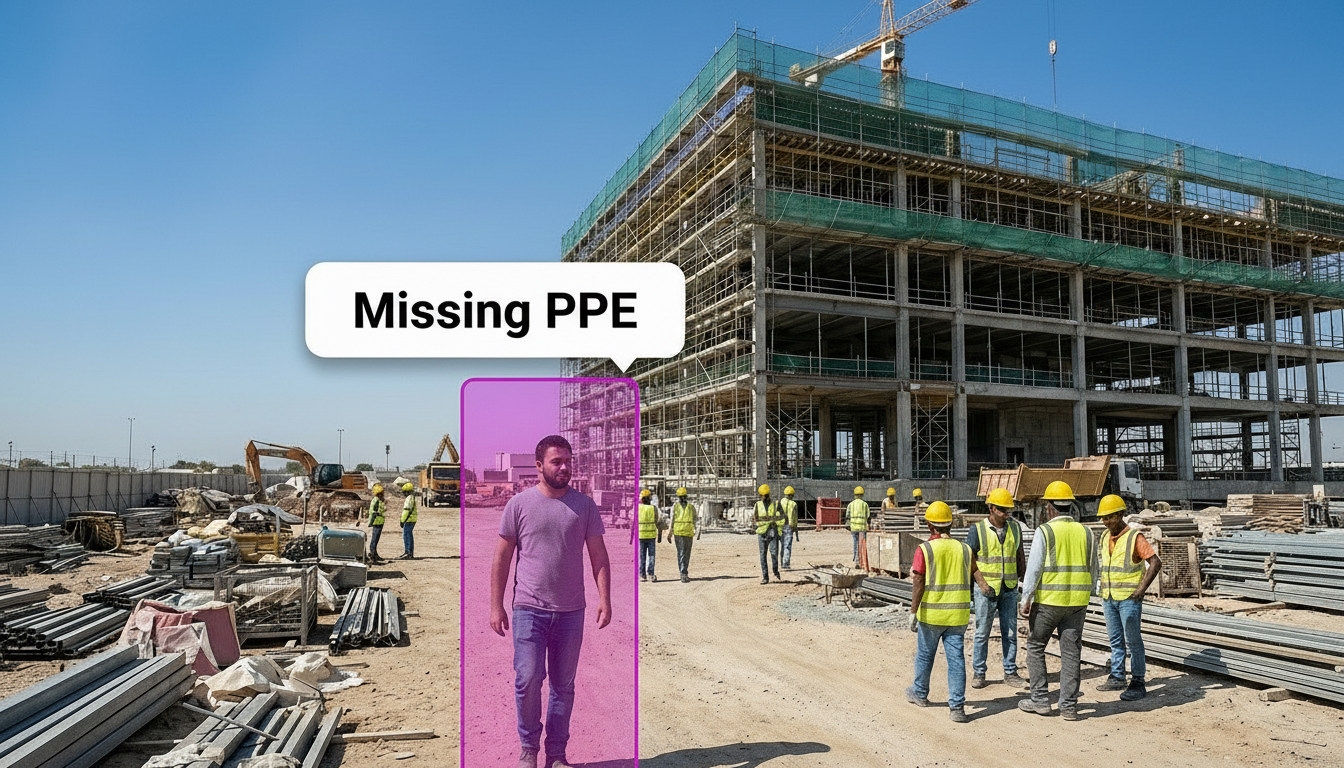
- Replace reactive response with real-time alerts. Instead of discovering a violation days later, Spot AI's Video AI Agents flag events as they happen, from missing PPE to people entering a no-go zone, and send an alert to the right supervisor for in-the-moment coaching.
- Cut investigation time with intelligent search. Rather than scrubbing hours of footage, teams can search for events with simple phrases like "person in a red vest" or "forklift in the laydown yard," which surfaces the relevant clip in minutes.
- End multi-site blind spots with a unified dashboard. Spot AI gives you real-time visibility across every job site from one interface, so you can check high-risk areas and see which sites need attention without being on the ground.
- Reduce alert fatigue with context-aware models. Legacy motion-based systems fire dozens of nuisance alarms from weather, animals, or shadows. Context-aware AI models filter that noise and surface only business-critical events, so teams respond when it matters.
- Hold subcontractors accountable with time-stamped evidence. When disputes arise, time-stamped video is a single source of truth that documents unsafe behavior, damage, or unauthorized access, which resolves charge-back disputes faster.
- Connect the tools you already use. Open APIs and webhooks let Spot AI work alongside project management software such as Procore and BuilderTrend, so video context feeds the systems your teams already work in.
Tie automated detection directly to your severity levels. When an after-hours intrusion is a Level 3 event, the same rule that flags it can route an SMS to the on-call security director and log the clip for the escalation record, so detection and notification happen in one step instead of two.
Escalation templates for after-hours and line-down scenarios
Severity tiers become practical when you turn them into ready-made templates. Two patterns cover most cross-site situations, and they adapt well beyond construction.
- Retail after-hours template. Trigger on any person detected inside a closed store or outdoor lot during non-operational hours. Route a Level 3 alert by SMS to the on-call asset protection lead, escalate to local law enforcement if motion continues past a set threshold, and attach the clip to the case automatically. This mirrors how an incident resolution workflow deters loss while keeping evidence intact.
- Manufacturing line-down template. Trigger on an unattended workstation or a stopped line beyond an expected changeover window. Route a Level 2 alert to the shift supervisor by Teams, escalate to the plant manager if downtime continues, and log the event for a trend review. The goal is to shorten the gap between a stoppage and the decision that resolves it.
For a deeper walkthrough of the resolve step, see our approach to incident resolution and to using video analytics to reduce construction accidents.
How multi-site operators put escalation into practice
Escalation policy proves its value on unstaffed, dispersed sites, which is exactly the reality of a multi-site construction portfolio. Storage Asset Management runs roughly 50 virtually-managed facilities with no traditional on-site staff, all monitored through Spot AI. When the system detected intruders at one facility at 1 AM, it alerted police who arrived during the crime, and that location reported zero subsequent break-ins. Automated after-hours alerts route directly to local law enforcement, and a centralized dashboard covers every site, all working with the cameras already in place.
"confidence, efficiency, and security"
Lee Kunkle, Director, Storage Asset Management
The same detect, route, and document loop applies to a construction portfolio, where after-hours theft of copper, tools, and equipment is a persistent risk across remote and temporary sites. You can see more examples on the Spot AI customer stories page.
Key terms
- Escalation matrix. A chart that maps incident types and severity levels to primary and secondary owners, so the right person is notified without delay.
- Severity level. A classification, often Level 1 through Level 4, that sets the required response time and notification path for an incident.
- Video AI Agent. A pre-trained model that detects a specific situation, such as a no-go-zone entry or missing PPE, and can act by sending an alert or triggering a workflow.
- Time-stamped evidence. Video tied to a precise date and time that serves as an objective record for compliance, insurance, and subcontractor disputes.
A step-by-step guide to implementation
Deploying an automated escalation policy works best in phases, which keeps the transition smooth and adoption quick.
- Phase 1: assessment and planning (weeks 1 to 2). Analyze current processes and review recent incidents to see where escalation succeeded or failed.
- Phase 2: framework development (weeks 3 to 4). Build the severity classification, the escalation matrix, and the routing protocols.
- Phase 3: technology configuration (weeks 5 to 8). Configure your platform to match the policy, including automated routing rules, report templates, and alert notifications.
- Phase 4: training and deployment (weeks 9 to 12). Train personnel on the policy and run tabletop exercises with realistic scenarios so everyone knows their role.
- Phase 5: monitoring and refinement (ongoing). Track response time and escalation accuracy, gather feedback, and hold quarterly reviews to refine the policy.
Start small and expand. Pilot the escalation matrix and routing rules on two or three high-risk sites first, confirm response times improve, then standardize the same templates across the full portfolio. A phased rollout keeps adoption high and lets you refine the severity levels before they go company-wide.
Turn incident management into an operational advantage
Building and automating your escalation policy strengthens safety and builds a more resilient, profitable operation. An automated workflow delivers the real-time visibility to manage risk with foresight, the documentation to protect your margins, and the cross-site data to scale without adding proportional headcount. The result is a program that treats incident management as a source of operational strength rather than a cost center.
Want to see how Spot AI streamlines incident escalation across all your construction sites? Book a demo to experience the platform in action.
Frequently asked questions
What are the best practices for incident escalation in construction?
Best practices include establishing clear severity levels, creating a formal escalation matrix that defines roles, automating notifications to reduce delays, documenting every step for compliance, and running regular training and simulations so teams are prepared.
How can automation improve incident response times?
Automation enables real-time incident reporting from the field and routes alerts to the correct personnel based on predefined rules. That removes manual decision-making and communication delays. As a result, teams acknowledge and act on critical events far faster.
What are the compliance requirements for incident management in construction?
Key requirements include aligning with OSHA construction standards and meeting mandatory reporting timelines. A work-related fatality must be reported within 8 hours, and a hospitalization, amputation, or loss of an eye within 24 hours (Source: OSHA). Employers should also maintain accurate injury logs and site-specific safety plans with documented training.
How do you manage incidents across multiple construction sites?
Effective multi-site management relies on a centralized platform that gives one unified view of every location. That supports standardized reporting, consistent escalation protocols, real-time visibility for leadership, and the ability to spot systemic trends across the whole project portfolio.
How can video AI help guard against trespassing on construction sites after hours?
A video AI platform turns the cameras you already own into an anticipatory security tool. You can configure AI coworkers to detect people entering the site during non-operational hours and route a real-time alert to security personnel or managers. That enables a fast response to deter theft or vandalism, with time-stamped video evidence for any follow-up.
About the author
Sud Bhatija is COO and Co-founder at Spot AI, where he scales operations and GTM strategy to deliver video AI that helps operations, safety, and security teams boost productivity and reduce incidents across industries.

