




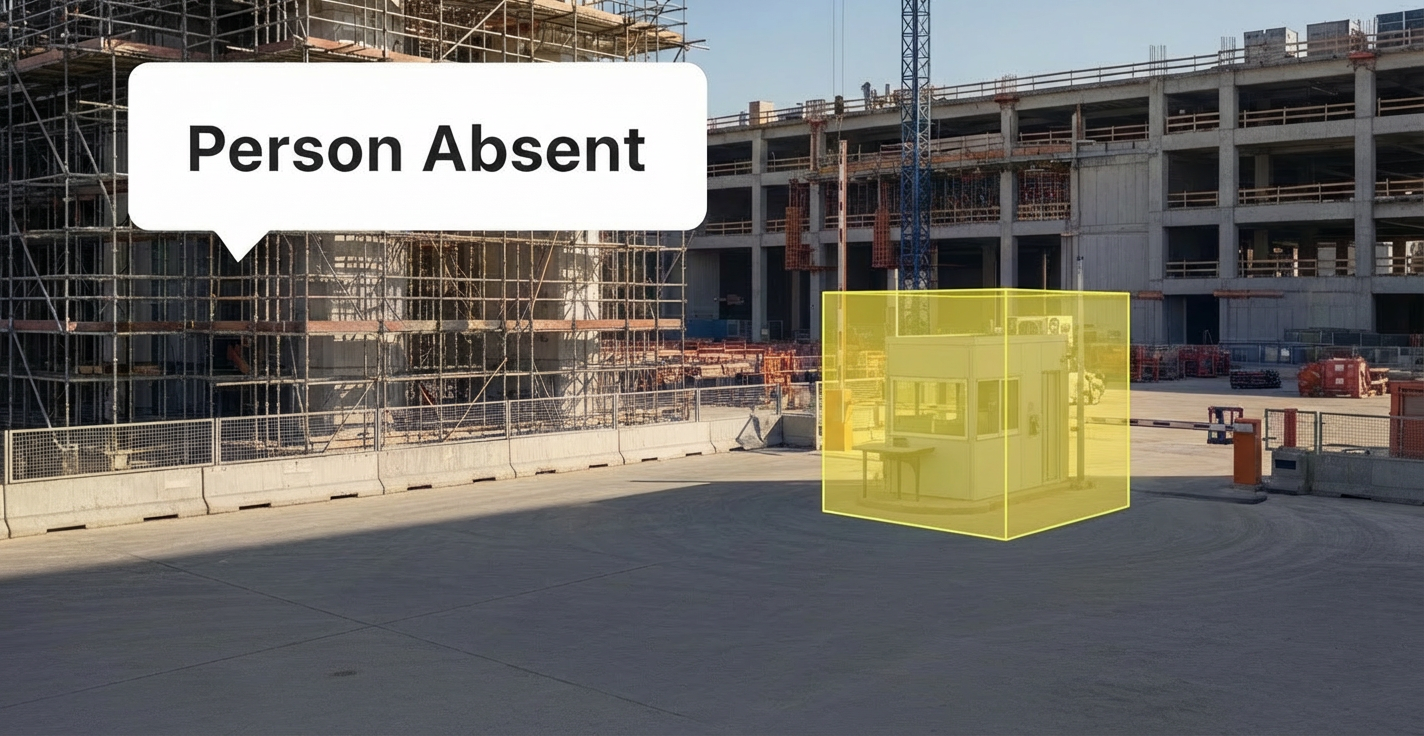


Managing a large construction site often feels like trying to conduct an orchestra where half the musicians are invisible and the other half are constantly moving chairs. As a site superintendent, you are the "eyes and ears" of the general contractor, responsible for orchestrating complex activities across multi-acre sites. You manage day-to-day operations, coordinate dozens of trades, and bridge the gap between the project management office and the field.
However, the physical reality of modern construction makes comprehensive oversight tough to achieve. You cannot be at the delivery gate, the high-risk excavation zone, and the material laydown area simultaneously. This visibility gap creates a specific, gnawing frustration: arriving at a critical checkpoint—like a safety station or a guarded entry—only to find it unmanned. By the time you discover the absence, the damage is done. Materials are delayed, unauthorized personnel have slipped through, or a safety protocol has been breached.
This operational blind spot is exacerbated by a projected shortage of nearly 499,000 workers by 2026 (Source: Buildern). With fewer qualified hands on deck, verifying that essential posts are staffed is harder than ever. Legacy video systems offer little help; they passively record the empty chair, leaving you to discover the issue hours later during a reactive footage review.
To maintain schedule adherence and safety standards, leaders are turning to "person absent" alerts. This capability shifts cameras from passive recording to automated monitoring that can notify you promptly when a vital checkpoint appears unmanned. By leveraging video AI, you can shift from reactive firefighting to forward-looking site management, ensuring that the right people are in the right places to keep the project moving.
Understanding the basics regarding video AI
Before discussing specific applications, it is helpful to clarify the technology driving these insights. Video AI refers to computer vision systems that analyze video feeds to detect specific objects, behaviors, or anomalies in real time. Unlike simple motion detection, which triggers alarms for blowing debris or passing traffic, video AI distinguishes between people, vehicles, and machinery.
Key terms to know:
Computer vision: the field of AI that enables computers to derive meaningful information from digital images or video inputs.
Person absent detection: an AI capability that triggers an alert when a specific zone (like a security desk or machine operator station) detects no human presence for a set duration.
Critical checkpoint: a designated location on a job site where presence is mandatory for safety or operations, such as a site access gate, a crane cab, or a hazardous material storage entrance.
False positive: an incorrect alert indicating a presence or absence that did not occur. Advanced AI considerably minimizes these by learning site-specific patterns (Source: Blaxtair).
The operational reality of the site superintendent
The role of a superintendent is defined by accountability. You are judged on safety performance metrics like Total Recordable Incident Rate (TRIR), Schedule Performance Index (SPI), and labor productivity. Yet, the tools available to manage these KPIs often fail to match the complexity of the job.
Addressing core frustrations with intelligent monitoring
According to industry analysis, superintendents face distinct obstacles that traditional monitoring fails to address. Mapping these frustrations to modern solutions reveals how "person absent" alerts and video AI fill the gap.
Core frustration | Traditional "solution" | The operational gap | Spot AI solution |
|---|---|---|---|
Reactive security | Passive video recording | Theft or absence is discovered after the incident occurs. | Person Absent and Loitering notifications can trigger quickly when presence deviates from the configured norm. |
False alarms | Simple motion detection | Wind or animals trigger warnings, causing "alarm fatigue" and ignored notifications. | Intelligent AI algorithms distinguish legitimate activity from actual anomalies. |
Manual review | Scrubbing hours of video | Valuable time is wasted searching for evidence of a dispute or incident. | Smart search allows you to find "person without hard hat" or "vehicle in zone" in seconds. |
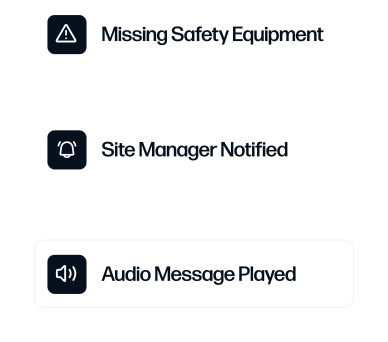
Safety blind spots | Periodic site walks | Unsafe behaviors occur between inspections, increasing liability. | Missing PPE detection and Person Enters No-go Zones can provide continuous automated monitoring during configured hours. |
Equipment visibility | Manual logs/spreadsheets | Equipment sits idle or goes missing without timely notice. | Vehicle/Forklift Absent alerts notify you when machinery moves or sits unused. |
The cost of the invisible workforce
The impact of poor visibility is financial. Underutilized construction assets can reduce productivity by up to 20%, often resulting in project delays and costly overruns (Source: Zenduit). When a forklift operator is missing from the loading dock, or a flagger is absent from a traffic control point, the ripple effect delays every subsequent trade.
Furthermore, miscommunication between field and office teams represents a costly operational inefficiency. If a superintendent assumes a checkpoint is staffed based on a morning schedule, but the worker left two hours ago, the project schedule slips silently. Real-time absence notifications bridge this information gap, allowing you to reallocate resources before the schedule is impacted.
How 'person absent' alerts monitor critical checkpoints
"Person absent" alerts function by defining a specific zone within a camera's view—such as a reception desk, a security gate, or a machine control station—and setting a rule: "If no person is detected here for more than X minutes during work hours, send an alert."
This capability is particularly effective for monitoring vital checkpoints on large sites:
Site access control points: confirm security guards or gatekeepers are present to process deliveries and vet subcontractors. An absence here causes traffic backups and material delays.
Hazardous zone monitoring: confined spaces or high-voltage areas often require a "hole watch" or safety observer. If that observer leaves, the work must stop. An alert helps maintain compliance with safety protocols.
Equipment operator stations: for crucial path activities involving cranes or batch plants, the operator's presence is non-negotiable. Detecting an absence right away allows you to investigate if the operator is on break, sick, or reassigned.
Tool cribs and material depots: unmanned tool cribs lead to shrinkage and inventory chaos. Alerts help guard against these assets being left vulnerable without supervision.
Enhancing safety and compliance through video AI
While "person absent" alerts address attendance and continuity, integrating them with broader video AI capabilities supports a more comprehensive safety workflow. Construction remains one of the most hazardous industries, and OSHA's 2025 regulations are raising the bar for safety compliance, emphasizing real-time verification.
1. Automating PPE compliance
Manual inspections miss the vast majority of infractions. AI-powered systems can detect Missing Personal Protective Equipment (PPE), such as hard hats or high-visibility vests. This does not just flag violations; it helps you identify trends. If one subcontractor consistently triggers PPE alerts, you have the objective data needed to hold them accountable during safety stand-downs.
2. Managing restricted zones
On a busy site, workers often take shortcuts through dangerous areas. Person Enters No-go Zones alerts notify you if someone crosses into a lift zone, an excavation perimeter, or a chemical storage area. This timely alert helps you intervene to mitigate risk, rather than only documenting a close call later.
3. Reducing equipment-related incidents
Forklifts and heavy machinery are major sources of risk. Forklift Enters No-go Zones capabilities help enforce traffic management plans by alerting you when vehicles veer into pedestrian-only walkways. This separation of man and machine is critical for improving the Total Recordable Incident Rate (TRIR).
Operational efficiency: moving beyond safety
The value of video AI extends beyond mitigating accidents; it is a tool for protecting profit margins. Construction operates on tight 3-7% profit margins, meaning small overruns can eliminate profitability (Source: Deloitte).
Improving schedule reliability
The Schedule Reliability Index (SRI) measures the percentage of tasks completed on time. By using automated notifications to ensure crews are present and equipment is utilized, you address the "micro-delays" that accumulate into missed milestones. If a concrete pour is scheduled, checking the camera feed or receiving an alert that the crew has not arrived allows you to call the sub, rather than waiting for the truck to show up.
Optimizing equipment utilization
Equipment rental and depreciation are massive costs. AI can track Vehicle/Forklift Absent status to determine utilization rates. If a rented excavator triggers an "absent" alert (meaning it is not in its staging area) but is also not being tracked as "active" in a work zone, it may be sitting idle elsewhere. Identifying idle assets allows you to return rentals early or redeploy them to active areas, directly improving the project's bottom line.
Streamlining subcontractor accountability
Disputes over delays and rework are common. Without objective data, superintendents struggle to prove that a sub was late or absent. Time-stamped video evidence provides verified records of when crews arrived, how long they worked, and when they left. This data removes the emotion from disputes and enables fact-based accountability discussions.
Implementation best practices for site superintendents
Deploying advanced monitoring does not require a complete overhaul of your current infrastructure. Modern solutions are designed to layer onto existing systems.
Start with high-risk areas: do not try to monitor every square foot right away. Identify your top 3 vital checkpoints—likely the main gate, the primary material laydown yard, and the active lift zone.
Integrate with existing workflows: alerts should flow into the communication channels you already use. If your field team uses mobile tablets, confirm the notifications are delivered there via SMS or email, rather than requiring them to sit in a trailer watching a screen.
Communicate transparency to the workforce: worker buy-in is essential. Explain that these alerts are about safety and schedule continuity, focusing on operational support rather than individual oversight. When workers understand that the system verifies their relief arrives on time or that the tool crib stays open, adoption increases.
Leverage camera-agnostic platforms: you likely already have cameras on site. Choose a solution that connects to your existing hardware rather than requiring proprietary, expensive new cameras. This approach allows for fast deployment and protects your hardware investment.
Selecting the right video AI partner
When evaluating solutions, it is crucial to look beyond basic recording capabilities. You need a platform that supports your team with practical, configurable tools.
Feature | Spot AI | Traditional Video Systems | Generic AI analytics |
|---|---|---|---|
Deployment speed | Plug-and-play; often live in minutes depending on site setup. | Weeks for cabling and server setup. | Varies; often requires complex calibration. |
Hardware flexibility | Camera-agnostic; works with most IP cameras. | Often locks you into proprietary hardware. | May require specific camera brands. |
Searchability | Google-like search for events/objects. | Manual fast-forward/rewind. | Limited to specific pre-defined tags. |
User access | Unlimited user seats for all subs/stakeholders. | Licensed per user (expensive). | Often restricted to security teams. |
AI capabilities | Pre-trained agents for PPE, Absence, No-go Zones. | None (passive recording). | often requires expensive add-on modules. |
Transforming Site Management from Reactive to Proactive
The construction industry is evolving, and the role of the superintendent is shifting from reactive problem-solver to a more forward-thinking operations manager. In an environment constrained by labor shortages and compressed schedules, you cannot afford to leave vital checkpoints to chance.
"Person absent" alerts provide the visibility needed to ensure that your site remains secure, compliant, and productive, even when you cannot be physically present. By integrating video AI into your daily workflow, you make your camera network a proactive tool that helps protect schedules, workers, and budgets.
Want to see Spot AI’s video AI in action on your construction site? Request a demo to explore how intelligent notifications and real-time alerts can streamline your operations.
Frequently asked questions
How do "person absent" alerts minimize false alarms?
Advanced AI uses deep learning to recognize human forms, distinguishing them from shadows, animals, or blowing tarps. You can also configure the system to alert only after a specific duration of absence (e.g., "alert if desk is empty for >5 minutes"), which accounts for brief, legitimate breaks (Source: Blaxtair).
Can this technology work with my current construction management software?
Yes. Modern video AI platforms offer open APIs that allow integration with project management tools. This means safety incidents or attendance gaps can automatically generate logs or tasks within your existing dashboard, minimizing manual data entry.
Is this technology compliant with privacy regulations?
Video AI analyzes behaviors and presence, not necessarily identity. Features like face blurring can be employed to protect individual privacy while still tracking safety compliance and attendance. Clear data governance policies ensure that footage is used strictly for operations and safety.
How does this help with labor shortages?
While it cannot create new workers, it maximizes the efficiency of the ones you have. By minimizing idle time and ensuring critical posts are staffed, you can achieve the same operational output with a leaner team. It transforms supervision from a 1:1 ratio to a 1:many ratio, allowing one superintendent to effectively oversee more ground (Source: Buildern).
About the author
Sud Bhatija is COO and Co-founder at Spot AI, where he scales operations and GTM strategy to deliver video AI that helps operations, safety, and security teams boost productivity and minimize incidents across industries.






.png)
.png)
.png)