






Production shift report: what it should show about lost changeover time
A production shift report should show output against plan, every changeover timed by phase against its standard, skipped procedure steps, the minutes required stations stood unattended, and the handover notes the next crew needs. Spot AI's AI Operations Assistant can supply the changeover phase times, flagged steps and a supervisor shift review from the cameras a plant already has, and the layout below works on paper too. It matters most for crews leaders rarely see: in 2024 and 2025, 15.3% of US manufacturing wage and salary workers usually worked a non-daytime schedule, including 5.9% on night shifts (Source: BLS).
Key takeaways
- A useful shift report has five core sections: output against plan, changeovers by phase, skipped steps, unattended time and handover notes.
- Log every changeover as its own row with phase times against the standard, so the report shows where the minutes went.
- Convert the output gap to equivalent minutes and reconcile it with non-overlapping line losses; what nobody can explain is what the report is missing.
- The plant manager reads a daily report by shift and line; the operations executive reads a weekly roll-up by plant.
- Footage turns a written cause into one the crew can check, while counts and off-floor causes still come from the line and the crew.
What should a production shift report include?
A production shift report records what one crew produced against plan and where the time went. Five sections cover it:
- Output against plan. Planned and actual units, with the gap converted to equivalent minutes at the standard rate, so losses from different causes can be compared.
- Changeovers by phase against standard. One row per changeover: products, start and end, the standard, the actual, and the minutes over or under in each phase.
- Skipped or out-of-order steps. Which procedure step, on which run, and what followed: a quality hold, rework or a restart.
- Unattended time. Minutes a required station stood empty while its line ran, recorded separately because an empty station does not always cost output minute for minute; see the capacity an unattended workstation costs a line.
- Handover notes. Open issues, the next changeover and whether its parts, tools and people are ready.
A report that stops at output, scrap and one downtime total can hide changeover overruns.
A shift report template a supervisor can copy
Copy these rows into a spreadsheet or a paper form. The example is illustrative: a second shift on a canning line that runs a constant 10 cases a minute, with a 25-minute changeover standard in three phases. Actual output means total cases produced, including cases on quality hold.
Section | What to record | Example entry (illustrative) |
|---|---|---|
Shift header | Plant, line, shift, crew lead, scheduled run minutes | Plant 2, Line 4, second shift, 480 minutes |
Output against plan | Planned and actual units, gap in minutes at the standard rate | Plan 4,550 cases (480 minutes less the 25-minute changeover standard), actual 4,130: 420 cases or 42 minutes short |
Changeover | Products, start and end, standard and actual by phase, delay reason for each phase over | 12 oz to 16 oz, 2:10 to 2:58 PM, 48 minutes against 25: stop and clean 10 (standard 6), swap and set 27 (standard 12), run-up to first good case 11 (standard 7); crew note on swap and set: waited for the change-part cart |
Skipped or out-of-order steps | Procedure step, run, what followed | Seam check done after the first cases instead of before, run 3; 30 cases held for quality review |
Unattended time | Station, start and end of each gap while the line ran, known reason (kept apart from line losses) | Case packer, three gaps totaling 18 minutes; one, 5:40 to 5:48 PM, was a walk for labels that were not staged |
Unplanned stops | Stops over 5 minutes: start and end, cause, who responded | Filler jam, 6:05 to 6:17 PM (12 minutes), cleared by the line mechanic |
Lost minutes, reconciled | Non-overlapping line losses in equivalent minutes, against the output gap | Changeover over standard 23, unplanned stop 12, unexplained 7 (slow running or short stops): total 42 |
Handover | Open items with next action, owner and due time; next changeover and its readiness | Stage change parts for the 11:30 PM changeover back to 12 oz (third-shift lead, by 11:00 PM); review the seam check sequence with the crew (day supervisor, 7:00 AM) |
Read it as a plant manager would. Swap and set accounts for 15 of the 23 minutes over standard and the crew's note points to the change-part cart, so check that on the clip before naming the cause. Then compare the packer's gap times with the 7 unexplained minutes; an empty station alone does not prove lost output. "Changeover 48 minutes, downtime 12" would have hidden both questions. For a fuller handover list, see the shift handover checklist in our bottling plant guide.
Convert the output gap to minutes before the shift ends: "42 minutes short, 35 explained" tells the supervisor the report is not finished.
What the plant manager reads daily and the operations executive reads weekly
Added up, the same rows answer different questions above the line:
Reader | Report | Questions it answers | Rows that answer them |
|---|---|---|---|
Next shift's lead | Shift report | What is still open, and is the next changeover ready? | Handover notes, unplanned stops, skipped steps |
Plant manager | Daily report, all shifts | Which shift and line lost the most minutes, and to what? Which phase runs long most often? | Lost minutes by cause and shift; changeovers within standard; overruns by phase |
Operations executive | Weekly roll-up, all plants | Which plants hit the changeover standard, and is the gap closing? | Changeovers within standard by plant; trend in minutes over standard; repeat skipped steps; unattended minutes per 100 scheduled station-hours |
For the executive layout, see executive roll-up dashboards for a multi-plant operation; for comparing second and third shifts across plants, see what the morning picture of off-shift operations should show.
How footage turns the report from a summary into evidence
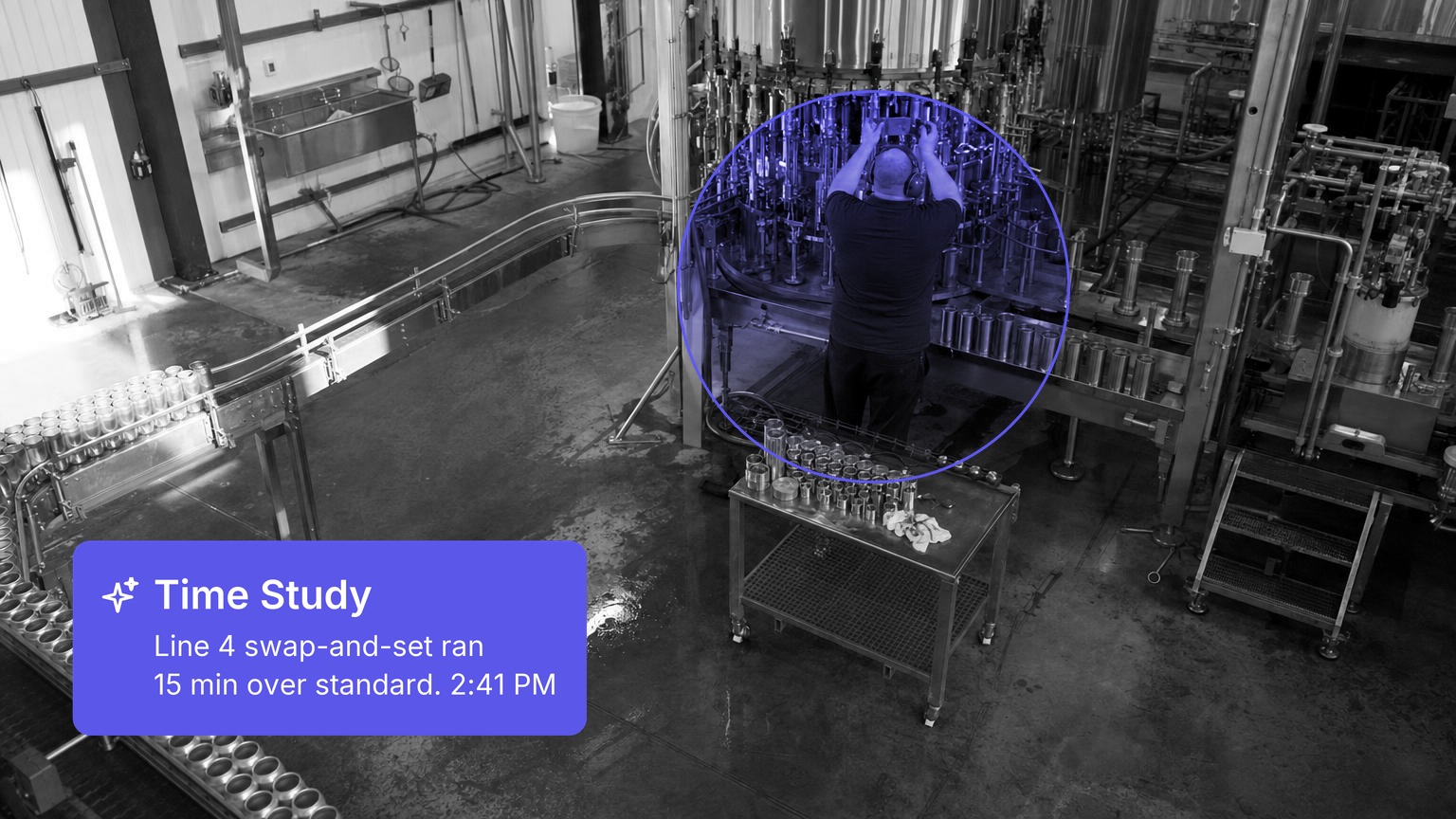
A written report can say swap and set ran 15 minutes over, but not why: a cart was late, a guide needed shimming, or the first case failed. Spot AI's AI Operations Assistant scores each changeover by phase, flags skipped or out-of-order steps and gives the supervisor a shift review with a stage-by-stage summary, a task timeline and key-moment clips, so phase times come from the run rather than from memory and the cause in the report can be checked against what happened at the line. The same clips show which work happened while the line was stopped (internal setup in SMED terms) that could be done while it still runs (external setup), which is how SMED with video shortens the stop. Operators can review their own runs with a scorecard, the routine in operator scorecards for changeover coaching.
"If there's an incident, Spot AI makes it easy to go back and find exactly what happened, instead of searching through hours of footage without knowing when it occurred."
Tyler Martin, General Manager, Duramatic
Footage shows only what a camera can see: unit counts still come from the line's counters, and causes that start off the floor, like a late material release, still need a reason code.
Common shift reports that hide the lost minutes
Six patterns keep lost minutes out of the report:
- One changeover line, no standard. "Changeover: 48 min" reads as normal. Put the standard and the phase split beside it.
- Overruns booked as planned downtime. When the whole changeover counts as planned, the 23 minutes over standard leave the loss column. Book the standard as planned and the overrun as a loss, the same rule that brings planned downtime back to standard.
- "Other" and "waiting" as reason codes. As a starting rule of thumb, review the code list when more than 10% of lost time sits there, and split waiting into parts, tools, people and sign-off.
- Totals that do not reconcile. If non-overlapping line losses do not add up to the output gap, show the unexplained remainder instead of spreading it across codes.
- Handover in free text only. "All good, changeover next" tells the next crew nothing. Ask yes or no: are change parts staged, is the first-piece check scheduled?
- Times written at the end of the shift. Recording times from memory blurs phase boundaries. Record them as they happen, or take them from the footage.
Agree on phase boundaries and standards with the changeover leads, then compare like-for-like changeovers on comparable lines, each against its own standard.
Key terms
- Changeover time. The time from the last good unit of one product to the first good unit of the next, the usual SMED convention.
- Changeover standard. The agreed target time for a changeover, split by phase.
- Output gap in equivalent minutes. Units short of plan divided by the standard rate; non-overlapping line losses should add up to it.
- Internal and external setup. SMED's split between changeover work that can only happen while the line is stopped and work that can be done while it still runs.
Putting the shift report to work
Spot AI's AI Operations Assistant is one way to get phase times and step checks from the cameras a plant already has, but the first change needs no software: add standards, phases and delay reasons to every changeover row, reconcile line losses to the output gap, and give every handover item an owner. Run it on one line for four weeks before adding lines.
Related reading: Operator scorecards: coaching from the changeover video shows what crews do with the phase times once they have them.
Frequently asked questions
What should be included in a production shift report?
Include output against plan, each changeover with phase times and delay reasons against its standard, skipped or out-of-order steps, unattended minutes at required stations, unplanned stops with start, end and cause, and handover items with an owner. Add one line that reconciles non-overlapping line losses to the output gap in equivalent minutes, so a missing cause shows up as a number.
How do you show lost changeover time on a shift report?
Give each changeover its own row with the standard, the actual and the minutes over or under in each phase, such as stop and clean, swap and set, and run-up. Book the standard as planned time and only the overrun as a loss.
What is the difference between a shift report and a daily production report?
A shift report covers one crew's shift and is written for the handover. A daily production report adds up every shift for the plant manager, showing which shift and line lost the most minutes, and to what.
Is there a simple shift report template for manufacturing?
Yes. Use eight rows: shift header, output against plan, changeovers by phase, skipped steps, unattended time, unplanned stops, lost minutes reconciled to the output gap, and handover. The template above gives an example entry for each.
Can cameras fill in a production shift report?
Spot AI's AI Operations Assistant scores each changeover by phase, flags skipped or out-of-order steps and gives supervisors a shift review with a stage-by-stage summary, task timeline and key-moment clips, on the cameras a plant already has. Unit counts and causes that start off the floor still come from the line's counters and the crew.
About the author
Sud Bhatija, Co-founder
Sud Bhatija is a co-founder of Spot AI, where he scales operations and GTM strategy to deliver video AI that helps operations, safety, and security teams boost productivity and reduce incidents across industries.